
Why is my Hikvision ColorVu white light staying on all night?
Your Hikvision ColorVu white light may stay on all night because the camera is configured to use white supplemental illumination continuously during night mode.
Other possible causes include:
- White-light illumination is set to On rather than Auto.
- The camera is deliberately maintaining colour night vision.
- The illumination schedule is configured incorrectly.
- Motion or event detection is triggering the light.
- Smart illumination settings are activating the white light.
- The camera has insufficient ambient light.
- The camera’s firmware or configuration needs attention.
- A setting has changed after a firmware update or configuration change.
- The camera has been manually configured for permanent white-light illumination.
The first thing to check is the camera’s night/illumination settings.
What Is the White Light on a Hikvision ColorVu Camera?
The bright white light on a Hikvision ColorVu camera is generally supplemental white illumination.
Unlike traditional infrared CCTV cameras, which use invisible IR illumination to produce a black-and-white image at night, ColorVu technology is designed to maintain colour imaging in very low-light environments.
That means the camera may use visible white light when the surrounding environment becomes too dark.
This is one of the main differences between a traditional IR CCTV camera and a ColorVu camera.
Traditional CCTV at night
Low light → IR illumination → black-and-white image
ColorVu
Low light → white supplemental illumination → colour image
The exact illumination behaviour depends on the particular ColorVu model and its configuration.
Why Does My Hikvision ColorVu White Light Stay On All Night?
There isn’t one single cause.
The most common explanation is that the camera is configured to use continuous white-light illumination during its night-time operation.
However, there are several things worth checking before assuming the camera is faulty.
1. The White-Light Setting May Be Set to “On”
This is one of the first things I would check.
Hikvision cameras can have illumination controls that determine how the supplemental light operates.
Depending on the model and firmware, you may find settings relating to:
- Supplemental light
- White light
- Smart illumination
- Illumination mode
- Night mode
- Day/night switching
- Brightness
- Schedule
If the supplemental light is configured to remain On, the camera can illuminate the scene throughout the night.

What to check When the light is on
Log into the camera’s web interface or the relevant Hikvision management system and look under the camera’s configuration/image/night/supplemental-light settings.
The exact menu names can differ between Hikvision models and firmware versions.
2. Your ColorVu Camera Is Designed to Use White Light at Night
This is an important point.
A ColorVu camera isn’t necessarily supposed to behave like an ordinary IR camera.
ColorVu’s purpose is to produce useful colour images in low-light conditions.
If the environment is extremely dark, the camera may need additional visible illumination to maintain that colour image.
So if you see a soft white glow from the camera at night, that can be normal operation rather than a fault.
Simple example
Imagine your camera is installed outside a house.
During the day:
Natural daylight → colour image → white light OFF
At dusk:
Light level falls → camera enters night mode
At night:
Insufficient ambient light → supplemental white illumination
The result can be a visible white light throughout the hours of darkness.
3. The Camera May Be Configured for Continuous Illumination
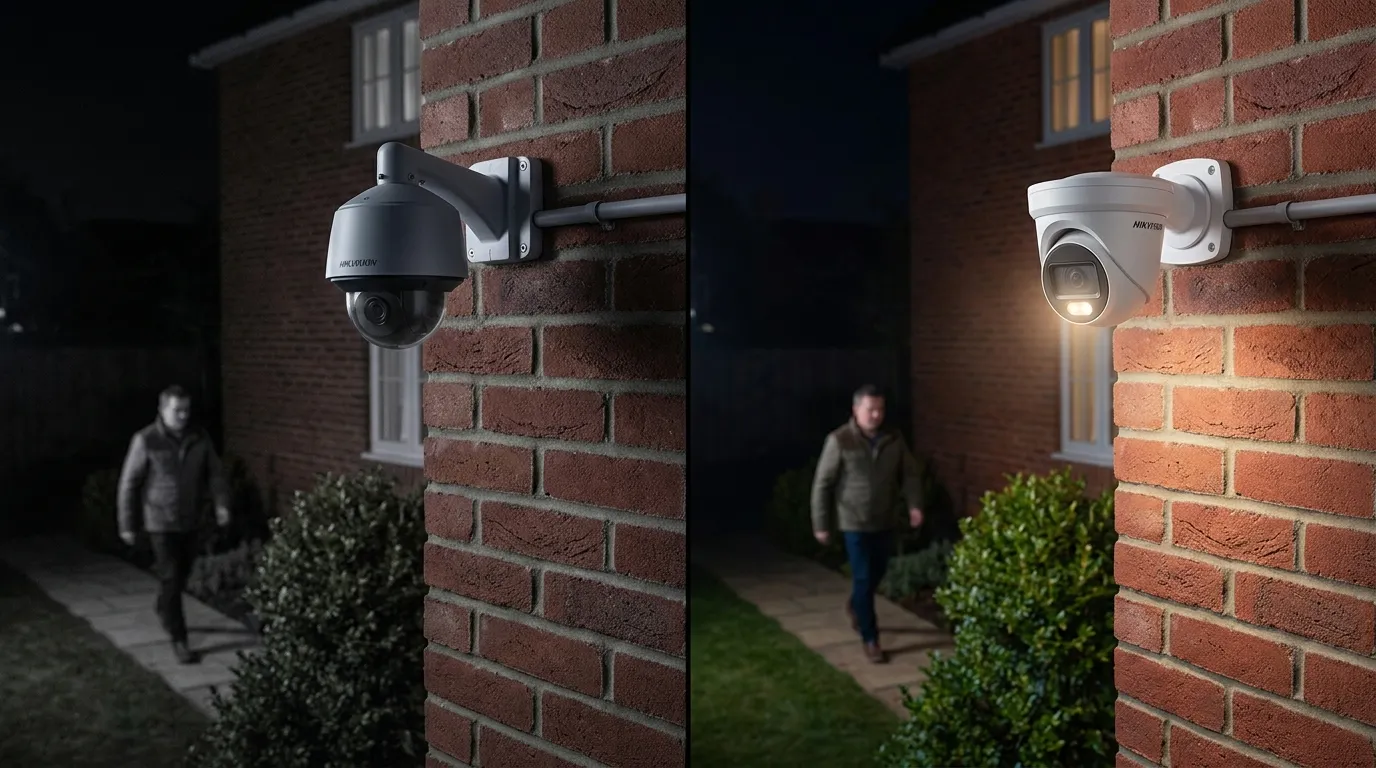
Some installations deliberately use continuous white illumination.
This can actually be useful.
For example, a property owner may want:
- Colour CCTV at night
- A visible deterrent
- Better identification of people
- Better identification of clothing
- Better vehicle colour information
- Improved illumination around entrances
In these circumstances, leaving the ColorVu white light on all night may be intentional.
The question isn’t necessarily:
“Why is it staying on?”
It may instead be:
“Is continuous illumination the best setting for this particular installation?”
4. Motion Detection or an Event May Be Triggering the White Light
Another possibility is that the camera is configured so illumination changes when an event occurs.
Depending on the camera model and configuration, events can include:
Motion detection
Intrusion detection
Line crossing
Human detection
Vehicle detection
Other smart events
If the white light only comes on when something moves, this points toward an event-related configuration rather than continuous night illumination.
Easy test
Watch the camera at night.
If the light:
stays on continuously → check illumination/night settings.
If the light:
turns on when someone approaches → investigate event/illumination behaviour.
5. The Camera May Not Be Getting Enough Ambient Light
ColorVu cameras are designed to perform in low light, but every installation is different.
A camera mounted in:
A completely dark garden
A side alley
Behind a building
Under a covered area
Facing away from street lighting
may have significantly less ambient light than a camera mounted near a well-lit driveway.
The camera may therefore decide that additional illumination is required.
Installation makes a difference
Two identical ColorVu cameras can behave differently at night simply because they’re installed in different environments.
6. The Camera’s Night Mode May Be Active
Your camera may have switched into its night-time operating mode.
Depending on the model, Hikvision cameras can have different day/night configuration options.
The camera may determine that the scene has become dark and activate the appropriate night-time settings.
If the supplemental white light is configured to operate during that mode, it can remain illuminated until the camera switches back to daytime operation.
7. A Schedule Could Be Keeping the White Light On
Some Hikvision configurations allow lighting or related camera behaviour to follow a schedule.
For example:
18:00 → night settings
06:00 → daytime settings
If the schedule is incorrect, the camera may remain in the night configuration longer than expected.
Check whether your camera has a configured schedule for:
Day/night
Illumination
Supplemental light
Image settings
Event rules
8. The White Light May Have Been Manually Configured During Installation
This is something that can easily be overlooked.
An installer may have deliberately configured the camera to keep its white light active.
For example, a customer might have requested:
“I want the camera to stay in colour at night.”
The installer may therefore have configured the illumination accordingly.
If you have inherited an existing CCTV system, you may not know what configuration decisions were made when the cameras were installed.
9. A Firmware Update or Configuration Change May Have Altered the Behaviour
If the white light only recently started staying on, think about what changed immediately before the problem appeared.
For example:
Firmware update
NVR update
Camera reset
Configuration change
New NVR
Camera replacement
Image settings changed
Camera added back to the NVR
Configuration restored from another device
If the camera previously behaved differently, compare its current settings with the previous configuration if you have a backup.
10. The Camera Could Have Been Reset to Default Settings
If somebody has reset the camera, some configuration settings may have changed.
This can affect:
Day/night mode
Supplemental lighting
Motion detection
Smart events
Image settings
Schedules
Before replacing the camera, check the configuration.
A surprising number of CCTV “faults” turn out to be configuration problems rather than hardware failures.
How Do I Stop My Hikvision ColorVu White Light Staying On?
The exact menu depends on the camera model and firmware, but the general process is:
Step 1
Log into the Hikvision camera.
Step 2
Open the camera’s configuration settings.
Step 3
Look for the Image, Day/Night, Supplemental Light, Illumination or similar settings.
Step 4
Check how the white light is configured.
Look for options such as:
Off
Auto
On
or model-specific illumination modes.
Step 5
If available, choose an automatic or appropriate illumination mode rather than permanently forcing the white light on.
Step 6
Save the configuration.
Step 7
Wait until it becomes dark and test the camera.
Should I Turn the ColorVu White Light Off?
Not necessarily.
Turning the white light off may solve the problem of the light being permanently visible, but it can also change the camera’s night-time image.
If the environment is very dark, switching the illumination off could result in:
Darker images
Reduced colour information
More image noise
Less useful identification
Poorer facial detail
Reduced vehicle-colour identification
Therefore, don’t simply turn the light off without checking the resulting night image.
ColorVu White Light vs IR Night Vision
4
Feature Traditional IR CCTV Hikvision ColorVu
Night image Usually black & white Designed for colour in low light
Illumination Infrared Visible supplemental white light on supported models
Visible light Usually invisible Can be clearly visible
Colour identification Limited at night Better where sufficient illumination exists
Deterrence Less obvious Visible white light can act as a deterrent
Very dark locations IR can help May require supplemental illumination
This is why a homeowner who is used to traditional infrared cameras may initially think:
“Why is my new ColorVu camera shining a light all night?”
The answer may simply be that the camera is doing what it was configured to do.
Is It Bad for a Hikvision ColorVu Camera to Have the White Light On All Night?
Not necessarily.
If the camera is designed and configured to use supplemental white illumination, continuous night operation can be part of its intended functionality.
However, you should consider the installation.
A permanently illuminated camera may:
Annoy neighbours
Illuminate bedrooms or windows
Create unwanted light spill
Attract attention
Affect nearby properties
Consume more power than necessary
For some installations, automatic illumination is therefore a better choice.
Does Leaving the ColorVu Light On Use More Electricity?
Yes, using active illumination consumes power, although the exact increase depends on the particular camera model and its lighting system.
If you have multiple ColorVu cameras and all of them are running visible illumination throughout the night, the combined power consumption can be greater than if the lights only activate when necessary.
For larger installations, this is worth considering when designing the CCTV system.
Why Is My Hikvision ColorVu Light On During the Day?
If the white light is staying on during daylight, that is a different situation and is worth investigating.
Possible causes include:
Incorrect day/night settings
Incorrect illumination configuration
Camera thinks the scene is dark
Camera is installed in a shaded location
Incorrect exposure/image settings
Schedule configuration
Event-triggered illumination
Firmware/configuration issue
Hardware fault
Check the camera during bright daylight.
If the camera still behaves as though it is permanently in night mode, investigate the configuration and day/night switching.
Why Does My ColorVu Camera Keep Switching the White Light On and Off?
If the camera repeatedly changes between illumination states, the problem could be related to borderline ambient-light conditions.
For example:
Light level falls → white light activates
Scene becomes brighter → light switches off
Light falls again → light activates
This can happen around dawn, dusk or when the camera is affected by nearby lighting.
Street lights, vehicle headlights, porch lights and other environmental changes can also influence what the camera sees.
Why Does My ColorVu White Light Come On When Someone Walks Past?
If the camera’s illumination is linked to an event or smart detection rule, movement may trigger a change in the lighting.
Check the camera’s event configuration for rules involving:
Motion detection
Human detection
Vehicle detection
Intrusion detection
Line crossing
Other smart events
If the light activates only when a person approaches, the behaviour may be intentional.
Can I Make My Hikvision ColorVu Camera Use Colour Without the White Light?
This depends on the specific camera model and available ambient light.
ColorVu cameras are designed to provide colour imaging in low-light environments, but colour performance depends on available light.
If you completely disable supplemental illumination in a very dark environment, the camera may still produce an image, but it may not provide the same level of colour detail or image quality.
In simple terms:
More light = better colour performance
Less light = darker/noisier image
The exact behaviour depends on the camera.
What If the White Light Never Turns Off?
If you’ve checked the configuration and the light remains on regardless of daylight/night conditions, work through these checks:
CCTV troubleshooting checklist
☐ Check supplemental-light settings
☐ Check day/night settings
☐ Check illumination mode
☐ Check schedules
☐ Check motion/event rules
☐ Check smart detection settings
☐ Check camera firmware
☐ Reboot the camera
☐ Check PoE/network stability
☐ Compare settings with another identical camera
☐ Test the camera in daylight
☐ Check whether the issue follows the camera
☐ Consider hardware failure if configuration is correct
A Simple Test You Can Do Tonight
If you’re trying to determine whether the white light is working normally, perform this simple test.
Test 1 — Daylight
Check the camera during bright daylight.
Light OFF?
Good.
Test 2 — Darkness
Wait until the surrounding area is properly dark.
Light ON?
This may be normal depending on the illumination configuration.
Test 3 — Check the settings
Change the supplemental-light setting to the appropriate automatic mode if available.
Test 4 — Observe the camera
Watch what happens when:
Nobody is present
Someone walks past
A vehicle approaches
A nearby light switches on
The environment becomes darker
This can help establish whether the light is continuous, scheduled or event-triggered.
When Should I Suspect a Fault?
A configuration problem should generally be investigated before assuming hardware failure.
However, consider a possible fault if:
The white LED stays on permanently regardless of configuration.
The camera behaves differently from an identical camera with the same settings.
The camera won’t switch between day and night modes correctly.
The camera has recently suffered water ingress.
The camera has been physically damaged.
The illumination is flickering unexpectedly.
The camera repeatedly reboots.
The image has simultaneously developed other problems.
Resetting the correct configuration doesn’t resolve the issue.
At that point, professional CCTV troubleshooting may be worthwhile.
Hikvision ColorVu White Light Troubleshooting Guide
Problem Possible cause What to check
White light on all night Continuous illumination Supplemental-light settings
White light activates with movement Event configuration Motion/smart events
White light on during daytime Day/night configuration Day/night settings
Light keeps switching Borderline light level Ambient lighting
Light started after an update Configuration/firmware Firmware/settings
Light won’t turn off Configuration or fault Reset/test settings
Image becomes very dark with light off Insufficient ambient light Lighting/environment
Different cameras behave differently Different configuration Compare settings
Frequently Asked Questions
Why is my Hikvision ColorVu white light staying on all night?
The most common reason is that the camera’s supplemental white illumination is configured to operate continuously during night mode. Other possibilities include automatic illumination settings, event triggers, schedules, insufficient ambient light or a configuration issue.
Should my Hikvision ColorVu light stay on at night?
It can be normal for a ColorVu camera to use visible white supplemental illumination at night, particularly when there isn’t enough ambient light to maintain the desired colour image. Whether it should remain on continuously depends on the camera model and configuration.
How do I turn off the white light on my Hikvision ColorVu camera?
Log into the camera’s configuration interface and check the supplemental light, illumination, day/night or image settings. If the camera provides an automatic illumination mode, use the appropriate automatic setting rather than permanently forcing the light on.
Does ColorVu use infrared?
ColorVu cameras are designed around low-light colour imaging, and supported models can use visible supplemental white illumination. The exact technology and illumination options vary between models.
Why does my ColorVu camera need a white light?
The supplemental white light provides additional visible illumination so the camera can produce a more useful colour image when ambient light is insufficient.
Does the white light mean my Hikvision camera is faulty?
No. A white light operating at night can be completely normal for a ColorVu camera. Check the camera’s configuration before assuming there is a hardware fault.
Why is my Hikvision ColorVu light on during the day?
Check the camera’s day/night mode, illumination settings, schedules and ambient-light conditions. If it remains permanently illuminated in bright daylight despite correct settings, further troubleshooting may be required.
Why does my ColorVu white light turn on when someone walks past?
The camera may have an event or smart-detection rule affecting illumination. Check motion detection, human/vehicle detection and other event settings.
Can I use ColorVu without the white light?
On supported cameras, you may be able to disable or alter supplemental illumination. However, in very dark conditions, turning the light off can reduce colour performance and overall image quality.
Will turning off the ColorVu light make the camera black and white?
It can, depending on the camera model and available ambient light. ColorVu is designed to perform in low light, but extremely dark scenes may not provide enough light for strong colour reproduction.
Is it normal for a ColorVu camera to be brighter than an IR camera at night?
Yes. Traditional IR cameras generally use invisible infrared illumination, while supported ColorVu cameras can use visible white supplemental illumination.
Does the ColorVu white light use a lot of electricity?
The light does consume additional power when operating. The exact consumption depends on the particular camera model and illumination system.
Why does my Hikvision ColorVu light keep switching on and off?
Changing ambient light, automatic illumination settings, schedules or event triggers can cause the light to switch between states. This can be particularly noticeable around dawn and dusk.
How do I stop my Hikvision ColorVu camera lighting up my neighbour’s house?
Check the illumination settings and camera positioning. You may be able to reduce illumination intensity, use an automatic mode or reposition the camera so that the light is directed where it is needed.
Why does my ColorVu camera look worse when I turn the white light off?
The camera may not have enough ambient light to maintain the same level of colour, brightness and detail. Supplemental illumination is there to provide additional light when the scene is too dark.
Final Answer: Should My Hikvision ColorVu White Light Stay On All Night?
It can be completely normal.
A Hikvision ColorVu camera may use visible white supplemental illumination at night to provide a bright, detailed colour image in low-light conditions.
If you don’t want the light on continuously, the first thing to investigate is the camera’s:
Supplemental Light → Illumination Mode → Day/Night Settings → Schedule → Event Settings
Don’t assume the camera is faulty simply because you can see a white light.
However, if the light never turns off, remains on during bright daylight, ignores the configured settings or behaves differently from identical cameras, then further troubleshooting is appropriate.
Need Help With Your Hikvision ColorVu Camera?
If you’ve got a Hikvision ColorVu camera that won’t switch correctly between day and night, the white light stays on constantly, or you’re having problems with the camera’s image, network, PoE or recording, the problem may be configuration rather than the camera itself.
CCTV.services provides CCTV installation, upgrades, troubleshooting and repair services.
For the quickest diagnosis, have the exact Hikvision camera model number, firmware version and a description of what the white light is doing available.